How did we do last month?
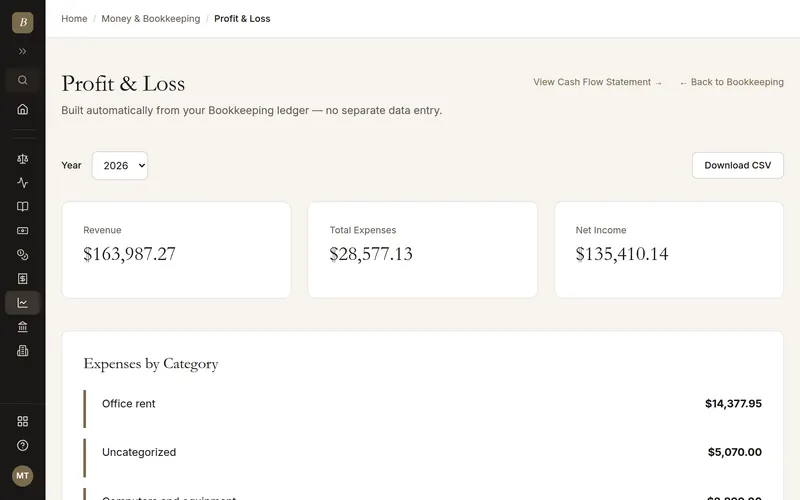
Profit and loss for last month, with what changed and the two costs worth a look.

Your income and expenses in one place, filled in from the invoices you send and the bills you pay. Your profit and loss and cash flow statements are built for you, ready when you need them.
Written and kept current by the BlissPoint Access team (BlissPoint Global Solutions, LLC), who build and run this tool. About us · Updated
Type or talk: “How did we do last month?.”
Aiva works in Bookkeeping, Profit & Loss, and Cash Flow the way you would, and fills in the details from your business.
Anything that leaves your business waits for one tap. Approve one, or approve them all, and it goes out.

How did we do last month?
Real screens from Bookkeeping, Profit & Loss, and Cash Flow, filled in for a sample business. Select any screen to see it full size.
Open Bookkeeping and answer three short questions: the kind of account, its name and its starting balance. The preview shows your books as you go.
Upload a CSV, OFX, QFX, QIF or CAMT.053 file from your bank. Most lines file themselves; the rest wait in To review.
Accept the suggested category or match for each line, or set a rule so the same payee files itself next time.
Open Reports and answer which period, what to compare with and whether you want month columns. The statement preview fills in as you answer.
Pick a year on Cash Flow to see operating, investing and financing cash, and download CSV or PDF for your accountant.
Enter a transaction once and it flows into P&L, Cash Flow, and the Balance Sheet automatically — no re-entering the same numbers into three separate reports.
Cash Flow reports by activity type (operating/investing/financing) the way QuickBooks does, without QuickBooks' price tag.
Bundled with Invoicing and Vendor & AP so your full financial picture lives in one place.
Accountants and bookkeepers earn 25% of what each referred customer pays for their first 12 months, paid monthly, the same simple offer as every partner. Xero pays partners nothing.
Snap a receipt and Aiva records the expense with the receipt attached. She also imports bank statements, sets up rules for repeat payees, helps reconcile and sends you a month-end summary.
Recommend BlissPoint to the businesses you look after, and earn 25% of every plan payment they make in their first 12 months, paid monthly. Their accountant pack is one click away whenever you need it.
| Partner program | Share for the accountant | For how long |
|---|---|---|
| BlissPoint | 25% | Each client's first 12 months, paid monthly |
| Intuit ProPartner (from early 2027) | 10%, up to 25% at higher tiers | 3 years (12 months today) |
| Gusto | 5–20% by number of clients | Ongoing |
| Xero | None (perks such as a free subscription) | — |
Programs' published terms, checked October 2026. A client on Pro ($25 a month) earns you $75 in their first year. One offer for every partner: no tiers, no tracks to choose.
Single-ledger bookkeeping for income and expenses
Automatic Profit & Loss statement by category
Cash Flow statement broken out by activity type
Feeds directly into Balance Sheet and Statement of Owner's Equity
Receipt photos and PDFs become expenses with the receipt attached
Bank statement import, categorisation rules and a month-end summary from Aiva
No — both are built automatically from the same bookkeeping ledger.
Yes, and categorized expenses also feed the Federal Tax Deduction Access tool.
Join the partner program from your BlissPoint account, share your link with clients, and earn 25% of what each referred customer pays for their first 12 months, paid monthly. Earnings are paid by Stripe once they reach $25.
No — it's a single-entry ledger, which keeps it simple for small business owners while still producing real financial statements.
Answer the three questions on the Bookkeeping page to add your first account, then import a statement from your bank. No bank account? Add income and expenses by hand instead.
Your work is saved as you go, and our database keeps a rolling restore point covering the last 6 hours, so a recent mistake can be undone to the minute. Every night we also back everything up to a separate, encrypted cloud storage provider, keeping every nightly copy for 35 days and one copy a month for a year. Because the backups live with a different provider than the database, an outage or problem at one never takes your work with it.
It comes with every BlissPoint plan, along with every other tool your business needs. Try it all free for 14 days, no credit card needed.
A look at what's next as BlissPoint Access keeps growing.
Payroll and benefits, embedded business banking with virtual cards, business insurance, international money transfers and small business lending — joining the invoicing in any currency and credit building that are already live.
Tips, memberships, digital products, print-on-demand merch and livestreaming — joining the creator home page, owned audience list and Lifeboat backup that are already live.
AI-guided lessons plus live tutors for languages, music, art, trades, and more — for students and lifelong learners alike.
Property management, HR, personal budgeting and practice tools for therapists and other wellness pros are already live. Next: a tutor toolkit with AI-guided lessons, field service tools for trades, and much more…