Make a flyer for Saturday’s open house
A flyer in your brand colours and fonts. Want a story-size version too?
Start from a template or a blank page in the exact size each network wants, make it yours with your colours, fonts, photos and logo, and download it or send it straight to the Social Scheduler. Animated designs export as MP4 or GIF, so the same post works as a Reel.
Written and kept current by the BlissPoint Access team (BlissPoint Global Solutions, LLC), who build and run this tool. About us · Updated
Type or talk: “Make a flyer for Saturday’s open house.”
Aiva works in Design Studio the way you would, and fills in the details from your business.
Anything that leaves your business waits for one tap. Approve one, or approve them all, and it goes out.

Make a flyer for Saturday’s open house
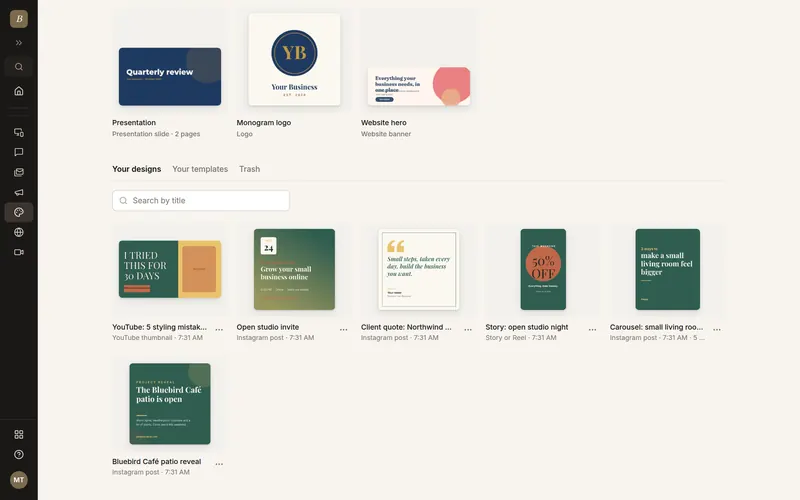
Real screens from Design Studio, filled in for a sample business. Select any screen to see it full size.
Answer two quick questions, what you are making and its name, and watch the live preview take that exact shape. Or pick any of the sizes or a ready-made template below.
Save your colours, fonts and logos once. Any template switches to them in one click.
Change the words, drop in your photos or free stock photos, and add shapes and icons. Smart guides keep everything lined up.
Give anything an entrance animation, or animate the whole page in one click, then preview it.
Design check flags text that is hard to read, blurry images, tiny text and words a story’s buttons would cover.
Download PNG, JPG, PDF, MP4 or GIF, resize it for every other network, or send it to the Social Scheduler as a draft post.
The features the others charge extra for come with every plan here: Canva keeps its brand kit, one-click resize, transparent PNG downloads and content planner in Canva Pro, and Adobe Express and VistaCreate keep resizing behind their paid plans too.
Design and posting in one place. “Schedule post” turns your design into a draft in the Social Scheduler, which posts to Facebook, Instagram, LinkedIn, Threads, Bluesky and Mastodon with no per-channel fee.
A design check none of them run for you: it measures the contrast of every piece of text against what is behind it, warns when a photo is stretched past its resolution, and marks where Instagram’s and TikTok’s buttons cover a story.
Your images and stock photos are saved to your own Files, so a design never breaks because a photo was taken down.
Product 3D turns one product photo into a real 3D commercial shot: lit, turning on a reflective stage, with a splash, smoke, light rays, sparks, petals or bokeh in slow motion. It's the look of a studio product spot, made in your browser at no extra cost.
26 ready sizes for Instagram, Facebook, LinkedIn, Pinterest, Bluesky, Threads, X, YouTube, Twitch, podcasts, ebooks, print and more, plus custom sizes
150+ templates: YouTube thumbnails, Reels covers, carousels, podcast covers, stream screens, media kits, menus, flyers, posters, logos and decks
Brand kit with colours, fonts and logos, and one-click restyling
Free stock photos, 1,700+ icons, shapes, text effects and font pairings
Photo filters, frames, shadows, transparency, layers, grouping and locking
Entrance animations, page timing and full-screen preview
Multi-page designs and carousels
One-click resize, or copies in every size at once
PNG (with transparent background), JPG, print-ready PDF, MP4 and GIF
Autosave, undo history, and conflict protection across tabs
Product 3D: one photo becomes a 3D product video with studio, night, sunset or photo backgrounds
Cinematic effects in slow motion: water splash, smoke, light rays, sparks, petals, bokeh
Aiva shows you options (photos, clips, sound samples) to choose from before she builds
Real stock video footage in Motion videos, plus free natural voice-overs with captions and the music ducked under the voice
Design Studio comes with every BlissPoint plan, from $10 a month after a 14-day free trial, including the brand kit, resizing, transparent downloads and video export.
Yes. Choose Schedule post and the design becomes a draft in the Social Scheduler as images or an MP4 video. Pick the accounts and the time there.
Yes. Add entrance animations to text, photos and shapes, set how long each page shows, and download an MP4 or GIF. Pages without animation become a slideshow.
Yes. In a Motion video, open Voice-over and captions: Aiva writes a script from your words (or type your own), pick one of eight natural voices, and it is read for free with Kokoro, an open-source voice. The music dips under the voice and the words come up as captions, because most people watch with the sound off. The timing is measured from the voice itself, so the captions and each scene come in as the words are said.
Yes. Search the free stock library for video clips (or use your own videos from Files) and add them where you would add a photo. The clip plays in that spot in every style, under your words, music and logo, in every size from 9:16 to 16:9.
From free photo libraries whose images can be used without paying or crediting the photographer. A copy is saved to your Files when you use one.
Yes. Flyers, posters, business cards and postcards download as PDFs at their real size and 300 dpi.
You can choose from a curated set of Google Fonts, including serif, sans serif, display, script and handwriting styles. Uploading your own font files is not supported yet.
Yes. Product 3D gives your product real depth and turns it in the light on a reflective stage, with the background and effects you choose. A full 360-degree spin needs photos from all sides, or a short video walking around it.
Your work is saved as you go, and our database keeps a rolling restore point covering the last 6 hours, so a recent mistake can be undone to the minute. Every night we also back everything up to a separate, encrypted cloud storage provider, keeping every nightly copy for 35 days and one copy a month for a year. Because the backups live with a different provider than the database, an outage or problem at one never takes your work with it.
It comes with every BlissPoint plan, along with every other tool your business needs. Try it all free for 14 days, no credit card needed.
A look at what's next as BlissPoint Access keeps growing.
Payroll and benefits, embedded business banking with virtual cards, business insurance, international money transfers and small business lending — joining the invoicing in any currency and credit building that are already live.
Tips, memberships, digital products, print-on-demand merch and livestreaming — joining the creator home page, owned audience list and Lifeboat backup that are already live.
AI-guided lessons plus live tutors for languages, music, art, trades, and more — for students and lifelong learners alike.
Property management, HR, personal budgeting and practice tools for therapists and other wellness pros are already live. Next: a tutor toolkit with AI-guided lessons, field service tools for trades, and much more…