
Find last year’s insurance certificate
Found it in Files, and here’s the link to share.

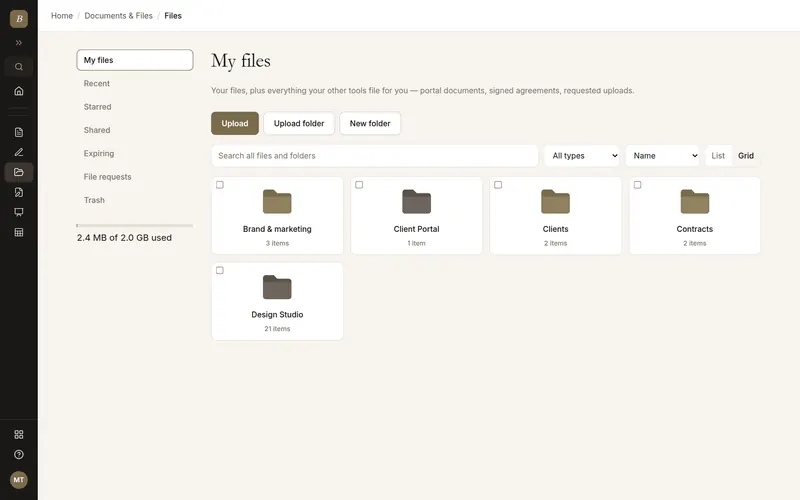
Keep your business files in one place, organized in folders. Share a file with a password or an end date, collect files from clients, and get old versions back if you need them.
Written and kept current by the BlissPoint Access team (BlissPoint Global Solutions, LLC), who build and run this tool. About us · Updated
Type or talk: “Find last year’s insurance certificate.”
Aiva works in Files the way you would, and fills in the details from your business.
Anything that leaves your business waits for one tap. Approve one, or approve them all, and it goes out.

Find last year’s insurance certificate
Real screens from Files, filled in for a sample business. Select any screen to see it full size.
Answer one question (Clients, Contracts, Receipts...) and add folders inside it if you like. The preview shows the structure.
Drop files or whole folders anywhere on the page, or import a .zip from Google Drive, OneDrive or Dropbox.
Link files to a contact, share a file or folder by link, or request files from a client.
Give licenses, insurance certificates or W-9s an expiry date and get an email 30 days before.
One file can go into a client’s portal, get edited in the PDF Editor or go out for signature — no downloading and re-uploading, and no copies drifting apart. Dropbox, Drive and Box need separate apps and integrations for each.
Signed agreements file themselves under “Signed documents”, linked to the person who signed, and every file can sit on a contact’s timeline next to their invoices and meetings.
Give a document an expiry date — an insurance certificate, a license, a W-9 — and it shows up under “Expiring” with an email reminder 30 days out. None of the three track document expiry for you.
Folders, drag-and-drop upload (including whole folders), search and type filters
Previews for images, video, audio, PDFs and text
Version history with one-click restore
Share links with passwords, expiry dates, view-only mode and view counts
File requests: collect files from anyone, no account needed — aim one at a contact and we email it
Trash with 30-day recovery, starred and recent files, and ZIP download of any selection
Aiva reads PDFs, spreadsheets, Word files and photos for highlights and answers
Nightly backups to a second provider, with long retention
No. Share links and file requests work for anyone. You can add a password, an expiry date, or turn off downloads for a link.
They land in Files under Client Portal, in a folder for that client, so everything they send you is in one place alongside your own files.
Yes. Uploading a new version, or saving from the PDF Editor, keeps the previous one. You can download or restore any earlier version.
Deleted files and folders go to the trash for 30 days, and restoring a folder brings back everything that was in it.
Large files go up in pieces, four at a time, straight to storage. If your connection drops, only the piece that failed is sent again, and you see the percentage and time left while it uploads, in Files and when you attach a video or a zip to Aiva. Files inside a zip go up three at a time.
Yes. Attach a PDF, spreadsheet, Word file or photo in chat, or point her to one in Files, and she gives you the highlights, answers questions, translates it, or acts on it.
Up to 100 in one message: photos, videos, PDFs, spreadsheets, documents and zips, in any mix. A zip is unpacked into its own folder in Files and doesn’t count toward the 100. Aiva looks closely at the first 20 photos and reads the first 20 documents straight away, and opens the rest whenever she needs them.
Your work is saved as you go, and our database keeps a rolling restore point covering the last 6 hours, so a recent mistake can be undone to the minute. Every night we also back everything up to a separate, encrypted cloud storage provider, keeping every nightly copy for 35 days and one copy a month for a year. Because the backups live with a different provider than the database, an outage or problem at one never takes your work with it.
It comes with every BlissPoint plan, along with every other tool your business needs. Try it all free for 14 days, no credit card needed.
A look at what's next as BlissPoint Access keeps growing.
Payroll and benefits, embedded business banking with virtual cards, business insurance, international money transfers and small business lending — joining the invoicing in any currency and credit building that are already live.
Tips, memberships, digital products, print-on-demand merch and livestreaming — joining the creator home page, owned audience list and Lifeboat backup that are already live.
AI-guided lessons plus live tutors for languages, music, art, trades, and more — for students and lifelong learners alike.
Property management, HR, personal budgeting and practice tools for therapists and other wellness pros are already live. Next: a tutor toolkit with AI-guided lessons, field service tools for trades, and much more…