Invoice Acme for the March retainer
Invoice drafted for Acme, due in 14 days, with your logo. Send it?

Invoices and estimates with your logo, online card and bank payments, recurring billing, deposits and automatic reminders. Every card or bank payment lands in your books by itself, and Aiva follows up on anything late.
Written and kept current by the BlissPoint Access team (BlissPoint Global Solutions, LLC), who build and run this tool. About us · Updated
Type or talk: “Invoice Acme for the March retainer.”
Aiva works in Invoicing the way you would, and fills in the details from your business.
Anything that leaves your business waits for one tap. Approve one, or approve them all, and it goes out.

Invoice Acme for the March retainer
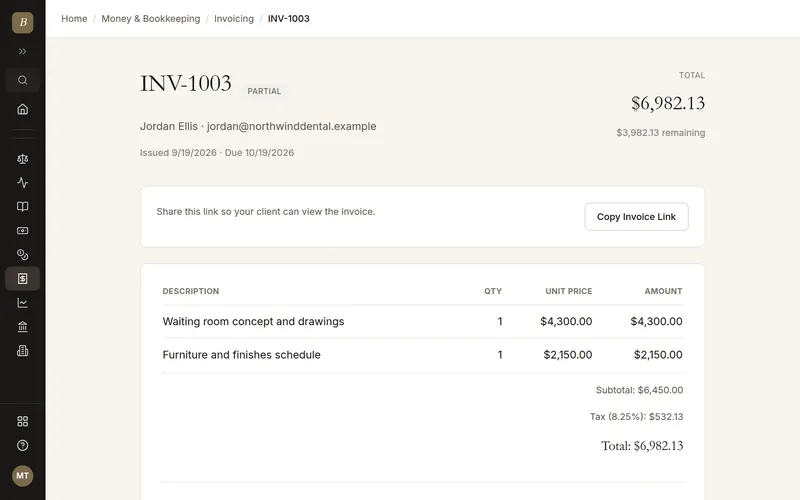
Real screens from Invoicing, filled in for a sample business. Select any screen to see it full size.
An email and a password (or Google) is all it takes. You land straight in a new invoice with a short checklist.
To let clients pay online, connect your own Stripe account in Invoicing settings (about five minutes). Until then, invoices go out without a Pay button.
A new invoice asks one question at a time, with your client's view updating beside it (below it on a phone). First: who are you billing? Type their name and email. They're saved to Contacts for next time.
Next, the due date, then one line per job (one is enough) with tax, then notes, then an optional deposit, reminders and late fee. Continue moves on; Back goes back.
On the last step press Save and send. Your client gets a link, no account needed. With payouts connected they can pay by card, or by bank transfer (ACH) for US-dollar invoices.
If it runs late, Aiva sends polite reminders. Card and bank payments land in your books by themselves.
Tell Aiva "invoice Acme $3,200 for the brand refresh, due in two weeks" and the invoice is ready to send. She watches it and follows up politely if it runs late.
Payments flow straight into Bookkeeping and your client record. There's no export or sync to keep running.
Estimates, deposits, recurring invoices, late fees and multi-currency are included, not add-ons.
Invoices and estimates with your logo, terms and a Pay button (card and bank)
Recurring invoices, deposits, partial payments and late fees
Automatic reminders, plus personal follow-ups from Aiva
Predicted pay date for each client from their history
Multi-currency with your home currency in the books
Payments recorded in Bookkeeping automatically
Nothing you typed is lost. Until you press Save, a copy of the form stays in your browser, so a reload, a closed tab, a dropped connection or a sign-out brings it back. If the invoice was changed in another tab or by someone else after you opened it, Save combines both versions instead of overwriting either, and asks you to check it and save again.
Yes. Aiva drafts the invoice from a sentence and sends it when you approve, or on her own if you allow it in Aiva settings. She also follows up on late invoices for you.
Each invoice has a Pay button for card or bank transfer. The payment is recorded on the invoice and in your books straight away.
You go straight to a new invoice with a four-step checklist: client, what you did, due date, Send. To get paid online, connect payouts (your own Stripe account) in Invoicing settings; until then invoices have no Pay button. Your logo can be added there too, and every other tool is free for 14 days.
Yes. Switch to BlissPoint imports your customers, items and invoices.
Your work is saved as you go, and our database keeps a rolling restore point covering the last 6 hours, so a recent mistake can be undone to the minute. Every night we also back everything up to a separate, encrypted cloud storage provider, keeping every nightly copy for 35 days and one copy a month for a year. Because the backups live with a different provider than the database, an outage or problem at one never takes your work with it.
It comes with every BlissPoint plan, along with every other tool your business needs. Try it all free for 14 days, no credit card needed.
A look at what's next as BlissPoint Access keeps growing.
Payroll and benefits, embedded business banking with virtual cards, business insurance, international money transfers and small business lending — joining the invoicing in any currency and credit building that are already live.
Tips, memberships, digital products, print-on-demand merch and livestreaming — joining the creator home page, owned audience list and Lifeboat backup that are already live.
AI-guided lessons plus live tutors for languages, music, art, trades, and more — for students and lifelong learners alike.
Property management, HR, personal budgeting and practice tools for therapists and other wellness pros are already live. Next: a tutor toolkit with AI-guided lessons, field service tools for trades, and much more…