
Set me up a 30-minute consult I can share
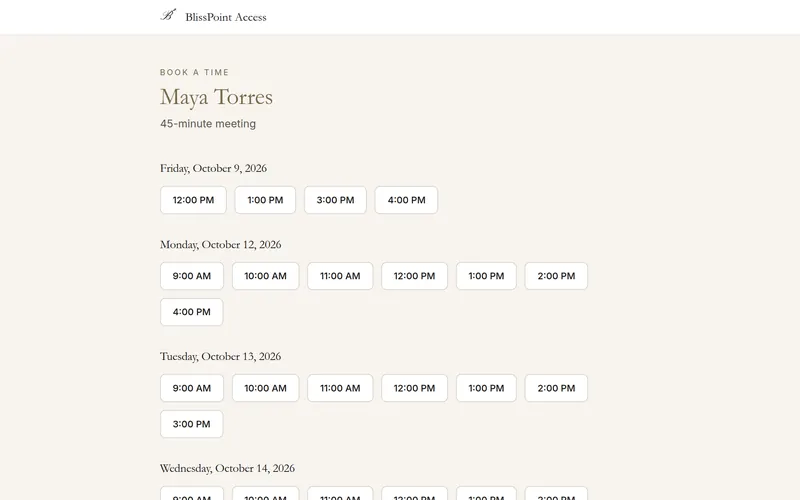
A booking link for 30-minute consults on weekdays, 9 to 5. Share it?

Set the hours you're free once, then share one link. People pick a time that suits them, in their own time zone, and the booking lands on your calendar and in your contacts.
Written and kept current by the BlissPoint Access team (BlissPoint Global Solutions, LLC), who build and run this tool. About us · Updated
Type or talk: “Set me up a 30-minute consult I can share.”
Aiva works in Scheduling & Booking Links the way you would, and fills in the details from your business.
Anything that leaves your business waits for one tap. Approve one, or approve them all, and it goes out.

Set me up a 30-minute consult I can share
Real screens from Scheduling & Booking Links, filled in for a sample business. Select any screen to see it full size.
Open Scheduling and the guided setup asks one thing at a time: your days and hours (or tap Weekdays 9 to 5), meeting length, the gap and notice you need, and the video call. A live preview of your booking page updates as you answer.
Copy your link and put it in your emails, website or bio. Visitors see your open times in their own time zone, detected from their device, and can tap Change to pick another.
The guest gets a confirmation with a calendar file, then reminders 24 hours and 1 hour before, all in the time zone they picked. You get the booking in your time zone.
Every guest email has Reschedule and Cancel links. Moves and cancellations update your calendar and email you.
Bundled with CRM, so a booked appointment automatically links to the right client record — no manual matching like standalone schedulers require.
Timezone-aware booking, matching Calendly's core convenience, without a per-user seat fee.
Pairs with Time Zone & Global Meeting Planner for teams coordinating across regions.
Aiva sets up your booking page for you (hours, meeting length, buffers, video link) and moves meetings when plans change.
Set weekly availability once
Shareable booking link, no back-and-forth
Automatic timezone conversion for the person booking
Bookings link to CRM contact records automatically
Visitors pick their own time zone from a searchable list
Confirmation with a calendar file, plus reminders 24 hours and 1 hour before
Guests reschedule or cancel from their email, no account needed
Yes. One booking page and 30 bookings a month are free, like Calendly's free plan. When you need more, sign up free to keep going; your page, hours and bookings stay as they are.
No — they book directly through your shared link.
Bookings are confirmed straight away, so there’s nothing to approve. The person who books gets a confirmation email with a calendar file, then reminders 24 hours and 1 hour before the meeting. You get a “New booking: [their name]” email at your account’s email address, with the time, the video link and their notes. That email only comes if Bookings is switched on in Settings → Notifications, so check that switch.
Yes. The booking page detects the visitor's time zone from their device and shows it at the top ("Times shown in Eastern Time (New York) · Change"). They can tap Change and search any city or zone, for example if they will be traveling. Their emails use the zone they picked; yours use your own. Daylight saving changes are handled for both.
Yes. Their confirmation and reminder emails have Reschedule and Cancel links. They pick a new open time or cancel without an account, and you get an email either way.
Yes. Each reminder has a Stop reminder emails link (and a one-click unsubscribe in their email app). The confirmation email always goes out.
Yes — calendar sync excludes times you're already busy elsewhere.
Edit each day under Weekly availability and press Save availability, or press Guided setup at the top to walk through the questions again. Cmd/Ctrl+K opens shortcuts and help.
Your work is saved as you go, and our database keeps a rolling restore point covering the last 6 hours, so a recent mistake can be undone to the minute. Every night we also back everything up to a separate, encrypted cloud storage provider, keeping every nightly copy for 35 days and one copy a month for a year. Because the backups live with a different provider than the database, an outage or problem at one never takes your work with it.
It comes with every BlissPoint plan, along with every other tool your business needs. Try it all free for 14 days, no credit card needed.
A look at what's next as BlissPoint Access keeps growing.
Payroll and benefits, embedded business banking with virtual cards, business insurance, international money transfers and small business lending — joining the invoicing in any currency and credit building that are already live.
Tips, memberships, digital products, print-on-demand merch and livestreaming — joining the creator home page, owned audience list and Lifeboat backup that are already live.
AI-guided lessons plus live tutors for languages, music, art, trades, and more — for students and lifelong learners alike.
Property management, HR, personal budgeting and practice tools for therapists and other wellness pros are already live. Next: a tutor toolkit with AI-guided lessons, field service tools for trades, and much more…