
Email every client about our new hours
A personalized email to 48 clients, with a test sent to you first.

Write one email, and everyone on your list gets their own copy, sent from your real address with their name and details filled in. It reads like a one-to-one email because it is one: no newsletter template, no "via" sender, and replies land in your normal inbox.
Written and kept current by the BlissPoint Access team (BlissPoint Global Solutions, LLC), who build and run this tool. About us · Updated
Type or talk: “Email every client about our new hours.”
Aiva works in Mail Merge the way you would, and fills in the details from your business.
Anything that leaves your business waits for one tap. Approve one, or approve them all, and it goes out.

Email every client about our new hours
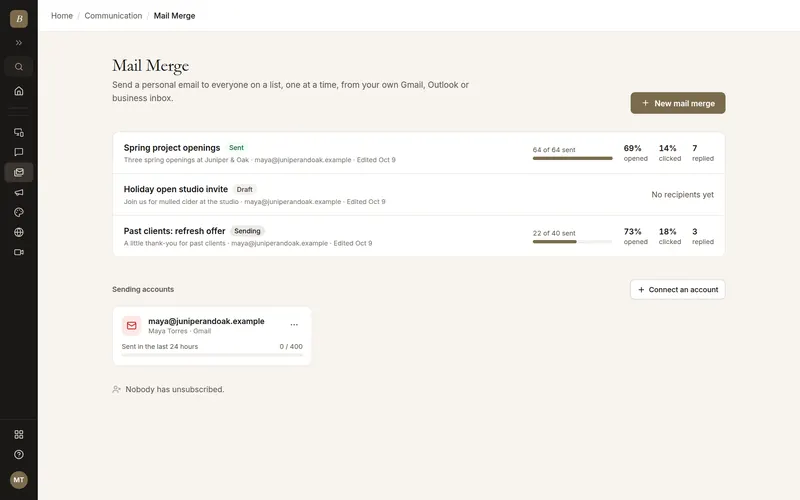
Real screens from Mail Merge, filled in for a sample business. Select any screen to see it full size.
Your first mail merge starts with two quick questions, one per screen: what it is for and the subject line (use {{first_name}}). A live preview shows how the email lands in an inbox.
Sign in with Google or Microsoft, or add any other inbox with its SMTP details. We only ask for permission to send, never to read your mail.
Pick people from your Contacts by tag or stage, upload a CSV saved from Excel or Google Sheets, paste a list, or use one of your BlissPoint spreadsheets. Duplicates, bad addresses and past unsubscribes are set aside for you.
Drop in fields like {{first_name|there}} from your columns, with a fallback for anyone missing one. Attach files, or a document that is personalized into its own PDF for each person.
Step through each recipient exactly as they will see it. A warning shows how many people are missing each field before anything goes out.
Send yourself a test, then send now or pick a time. Emails go out one at a time at a pace your provider is comfortable with, and pause automatically at your daily limit.
See who opened, clicked, replied or unsubscribed as it happens. Up to three follow-ups go out in the same thread to people who have not opened or clicked, and stop for anyone who replies.
Works from Gmail, Outlook and any SMTP inbox, all from one place. YAMM and GMass only work inside Gmail.
Recipients come straight from the Contacts you already keep for invoicing, scheduling and your client portal, and every email sent lands on that contact's timeline. Sheet add-ons start and end with a spreadsheet.
Attach a Document Writer template and each person gets their own PDF, generated with their details. Elsewhere, personalized attachments mean making every file yourself and linking it row by row.
A pre-send check counts exactly who is missing each field, so nobody gets "Hi ," by accident.
No per-email credits or daily caps of our own. Many add-ons limit free plans to around 50 emails a day; here the only limit is the one your email provider sets.
Gmail, Outlook and any SMTP inbox (Zoho, Yahoo, iCloud, Fastmail and more)
Recipients from Contacts, a CSV (from Excel or Google Sheets), a pasted list, or a BlissPoint spreadsheet
Merge fields in the subject and body, with per-field fallbacks
Per-recipient preview and a missing-field check before sending
File attachments and personalized PDF documents per person
Send now or schedule, with a pace and daily limit set per account
Open and click tracking, with a live report and CSV export
Up to three threaded follow-ups by open, click or everyone
One-click unsubscribe (Gmail and Yahoo sender rules) and a do-not-email list
CC, BCC, reply-to and a custom sender name
Nothing you type is lost. Your email saves by itself a moment after you stop typing, and a copy stays in your browser until the save lands, so a reload, a closed tab, a dropped connection, a restart or a sign-out brings it back. If the same mail merge is open in two tabs, both versions are combined instead of one overwriting the other.
Nothing is lost. Your changes save about a second and a half after you stop typing (and at once when you click away or switch tabs), and a copy stays in your browser until the save goes through, so after a reload we put back anything that had not saved yet.
As many as your email provider allows. We default to 400 a day for Gmail, 300 for Outlook and 200 for other inboxes, and you can raise or lower that per account. Past the limit, sending pauses and carries on by itself the next day.
Yes. Each email is sent through your own account, one at a time, so it shows your name and address and appears in your Sent folder. Replies come straight back to you.
No. Gmail and Outlook are connected with send-only permission, and SMTP can only send. Your password is encrypted, and you can disconnect at any time.
Mail Merge comes with every BlissPoint plan, from $10 a month after a 14-day free trial, with no per-email credits.
Mark a reply on the report with one click and that person gets no more follow-ups. Anyone who unsubscribes is skipped automatically, and each follow-up can go only to people who did not open or did not click.
Every email can include an unsubscribe link and the one-click unsubscribe header Gmail and Yahoo require for bulk senders. People who unsubscribe go on your do-not-email list and are left out of all your future mail merges.
Yes. Save your sheet as a CSV (Save As in Excel, or File, Download in Google Sheets) and upload it. Every column becomes a field you can use in your email. A spreadsheet you built in BlissPoint works directly, with no export.
Your work is saved as you go, and our database keeps a rolling restore point covering the last 6 hours, so a recent mistake can be undone to the minute. Every night we also back everything up to a separate, encrypted cloud storage provider, keeping every nightly copy for 35 days and one copy a month for a year. Because the backups live with a different provider than the database, an outage or problem at one never takes your work with it.
It comes with every BlissPoint plan, along with every other tool your business needs. Try it all free for 14 days, no credit card needed.
A look at what's next as BlissPoint Access keeps growing.
Payroll and benefits, embedded business banking with virtual cards, business insurance, international money transfers and small business lending — joining the invoicing in any currency and credit building that are already live.
Tips, memberships, digital products, print-on-demand merch and livestreaming — joining the creator home page, owned audience list and Lifeboat backup that are already live.
AI-guided lessons plus live tutors for languages, music, art, trades, and more — for students and lifelong learners alike.
Property management, HR, personal budgeting and practice tools for therapists and other wellness pros are already live. Next: a tutor toolkit with AI-guided lessons, field service tools for trades, and much more…