Post our weekend offer everywhere
One post, sized for Instagram, Facebook and LinkedIn, scheduled for Saturday 9:00.

Write a post once, tweak it for any network that needs it, and let it go out on its own. Connect as many accounts as you run, with no per-channel fee, and see what each post earned in likes, comments, shares and link clicks.
Written and kept current by the BlissPoint Access team (BlissPoint Global Solutions, LLC), who build and run this tool. About us · Updated
Type or talk: “Post our weekend offer everywhere.”
Aiva works in Social Scheduler the way you would, and fills in the details from your business.
Anything that leaves your business waits for one tap. Approve one, or approve them all, and it goes out.

Post our weekend offer everywhere
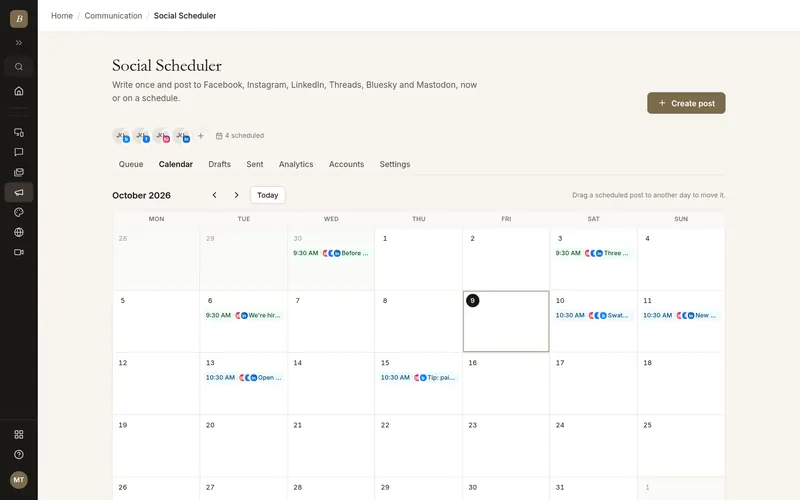
Real screens from Social Scheduler, filled in for a sample business. Select any screen to see it full size.
The first time you open it, write your first post (or pick an idea) and choose the networks your customers use. A live preview shows the post as you type.
Sign in with Facebook, Instagram, LinkedIn or Threads and approve posting, or add Bluesky with an app password and Mastodon with your server name. Your first post is waiting in the composer once you do.
Pick the days and times your audience is online. Every post you add to the queue takes the next open time.
Add photos or a video, then customize the text for any network. Character limits are counted per network as you type.
See each post the way it will look on each network, including where the "see more" cut falls and how photos are framed.
Add it to the queue, pick an exact time, or post right away. Drag posts around the calendar to move them.
Likes, comments, shares, views and link clicks per post and per network, so you know what to post more of.
Open Comments. Every new comment on your posts arrives within 10 minutes, sorted (people who want to buy first) with a reply already drafted in your voice. Edit it if you like and tap Send. Save answers you give often, and you get an email for buyers right away and for anything still waiting after 45 minutes.
Open Social Scheduler → Link in bio: each company gets a page (blisspointaccess.com/l/your-name). Add buttons for your free tools and offers; current offers go to the top on their own, and you see how many real people tapped each button.
Give an Instagram or Facebook post a keyword ("Comment GUIDE") and anyone who comments it gets the link by private message, once per person. Facebook and LinkedIn posts can put their link in the first comment instead of the caption.
Open Bulk upload, pick the company, and drop zips, folders or up to 1,000 photos and videos. Or attach the zip in Aiva and say “schedule these for” the company. Each network gets its own size and its best times, and you can close the page.
No per-channel pricing. Buffer charges per channel and its free plan stops at 3 channels; Hootsuite has no free plan at all. Here you connect every account you run.
Link clicks without a paid shortener: every link becomes a tracked BlissPoint short link tagged for each network, so you see which network actually sent visitors.
Photos are fitted to each network instead of rejected. A tall photo gets a soft border for Instagram, never a crop, and oversized images are resized for Bluesky automatically.
Automations can write and queue posts with a personal API key, held for your approval until you say otherwise. Useful for AI assistants and scripts, with none of your other data exposed.
It lives next to your CRM, Mail Merge and website tools, so your marketing runs from the same place as the rest of your business.
Aiva designs posts and short videos in your Brand Kit, shows you options to pick from, then schedules a week of posts at the right times for each network.
Facebook Pages, Instagram (business and creator), LinkedIn profiles and company pages, Threads, Bluesky and Mastodon
One composer with per-network text and live character counts
Photos, carousels and video, with alt text
Posting queue with your own weekly schedule
Month calendar with drag-to-reschedule
Drafts, approvals and automatic retries
Previews for every network before you post
Tracked short links with UTM tags per network
Likes, comments, shares, views and clicks per post
Email alerts when a connection needs renewing or a post fails
Every company gets one free page at blisspointaccess.com/l/your-name to put in your Instagram, TikTok or LinkedIn bio. Add up to 12 buttons (free tools, booking, offers). An offer with an end date goes to the top until it ends, then hides itself. Each button is a tracked short link, so you see how many real people tapped it (link-preview robots are left out), and the daily brief counts those taps.
Set a keyword on an Instagram or Facebook post (or write "Comment GUIDE" in a bulk-upload caption). Every few minutes BlissPoint reads new comments, and anyone who wrote the keyword gets the post’s link as a private reply, once per person per post, within the 7 days Meta allows. Your own comments never trigger it. It needs messaging permission on the connected account, so reconnect it if you are asked to.
Yes, on Facebook pages and LinkedIn, where links in the caption tend to reach fewer people. In the composer’s Channel settings, tick “Put the link in the first comment” (posts from Bulk upload, Autopilot and Aiva do this on their own): the caption goes out without the link and the page comments it right after. Posts made by Autopilot, Aiva or with an admin key do this by default.
Below about 500 views a week, clicks are too few to judge (0 clicks from 40 views tells you nothing). The daily brief says so and judges what early posts do move: profile visits, saves, follows and link-in-bio taps. Once reach grows, it judges by sign-ups and then real clicks.
Those networks ask us to approve each new account before it can connect. Tap Connect, enter the email or username you use to sign in to that network (or leave it blank to use your BlissPoint email) and tap Request Access. Your account is usually added within a few hours; the account card shows Being reviewed until then. We email you when it is ready, and the card then shows Connect so you can finish.
Open Social Scheduler → Bulk upload, pick the company and drop zips, folders or files: up to 1,000 photos and videos (2 GB) at a time. Or attach the zip in Aiva and tell her which company. Files go straight to storage, then a background job checks every one: it uses your captions (a posts.md, a CSV with file and caption columns, or a .txt named like each file) or writes the missing ones, gives each network its best size (9:16 for Reels, TikTok and Shorts, 4:5 for Facebook and LinkedIn), and schedules each network at its own best times. Several companies can run at the same time, and you can close the page. You get a notice listing what goes out where, from when to when.
Until a network has about two weeks of your own results, posts go out on research-based best practices (studies of millions of posts by Sprout Social, Hootsuite and Buffer), in your time zone: Facebook Tue–Thu 9 am–1 pm; Instagram Tue–Thu 10 am–3 pm, Reels also 6–9 pm; Google Business Profile Mon–Thu and Sat, 9–11 am; TikTok Tue–Thu and Sunday, 2–6 pm and 7–9 pm; YouTube Thu–Sat 3–6 pm; LinkedIn Tue–Thu 8–11 am and noon, no weekends; X Tue–Thu 9 am–noon; Threads Tue–Thu 9 am–noon and 6–9 pm; Pinterest Fri–Sun 8–11 pm and Saturday morning; Bluesky and Mastodon weekdays 9 am–noon. Then your own Analytics takes over. The full table is in Social Scheduler → Help.
Each network follows its own rhythm from your Analytics: how many posts a day still reach people (for example 2 a day on Facebook, 1 on Instagram to start), the days that reach the most, and the hours with the most reach. With under two weeks of results it starts from proven defaults and adjusts as your numbers come in. Aiva, Autopilot (with “Let Analytics decide”), Bulk upload and the automatic re-timing all use the same rhythm, so posts never pile up on one day. Bulk upload shows each company’s rhythm before you start.
They’re held as drafts with the reason, and everything else is still scheduled. Typical reasons: no caption could be written, or a video opens on a blank or wordless first frame (posts like that get almost no clicks). Open the draft, fix it, and schedule it. A network that can’t take a post (for example a photo for YouTube) is left out for that post only. To stop an upload, press Stop: its posts that haven’t gone out go back to drafts.
Yes, when your own numbers say so. Every few hours, upcoming posts move to a nearby time that reaches clearly more people on their networks: at least 25% more, within a day and a half of the planned time, never in the last two hours before it goes out, and an hour apart per account. You get a notice listing every move. To keep a post at its time, tag it fixed-time.
Yes. YouTube only takes videos, so a photo post goes to YouTube as a Short: your photos, up to five, fill a vertical video with a slow zoom (about 6 to 15 seconds). Posts with a video upload the video itself.
Only that network is left out. If YouTube, TikTok or any other account has a problem (it needs reconnecting, it’s down, or the post doesn’t fit its rules), the post still goes out on every other account at its time, from you, Autopilot or Aiva. The left-out network shows the reason and a Try again button on the post.
Posts sent to TikTok as drafts, as Autopilot does, wait in the TikTok app until you post them: TikTok has a person choose who sees each post. Open TikTok on your phone (the desktop app and website don’t show these drafts), tap Inbox, tap the notification from BlissPoint Access, choose who can see it and tap Post. The scheduler shows these as Waiting in your TikTok app, and we email you once a day while one is waiting.
Yes. Every Instagram post also goes to your Story by default (the first photo or video, for 24 hours), because Stories reach followers who do not scroll the feed. Untick “Also share as a Story” under the Instagram account in the composer to skip it for a post.
Yes. Links in your posts are tagged with the post they came from, so when someone books, fills in a form, accepts an estimate, pays an invoice or signs up on one of your BlissPoint pages, it is credited to that post and network in the Results column, with the money involved. The executive summary at the top of Analytics sums up what is working, what is not, what is changing and what to do next, for yesterday, 7 or 30 days.
Yes. Social Scheduler → Comments collects comments on your Facebook, Instagram, Threads, YouTube, Bluesky, Mastodon and LinkedIn company page posts every 10 minutes, labels each one (wants to buy, question, complaint, praise, spam) and drafts a short reply from your brand profile, without making up prices or promises. Nothing is sent until you tap Send. Saved replies can go out by themselves only when a comment is exactly one of their trigger words, such as “price” or “LINK”. You get an email when someone shows buying intent and when a comment has waited 45 minutes, and the daily brief lists the week’s top questions and objections. Facebook, Instagram, Threads and YouTube need one reconnect to allow replies.
Yes. Comments on your Instagram, Facebook, Threads, Bluesky and YouTube posts are read and sorted into positive, negative, questions and themes, with how fast you reply and which questions are still waiting. Add up to five competitors on Instagram or Bluesky to compare followers, growth and engagement, checked daily.
Views, reach (people reached), likes, comments, shares, saves, link clicks, follows and profile visits, plus watch time on videos (average seconds watched and total time) for Instagram Reels, Facebook and YouTube, and the day and time it went out. The Audience panel shows where followers live (countries and cities), their ages and gender on Instagram, Threads and YouTube, and country, seniority and industry for LinkedIn company pages. Every post also gets a vs-usual score against your own account, and Aiva notes how each post was made (hook, visuals, style, music, voice, font) so she can make more of what works.
Yes. In Social Scheduler, Accounts, open the account’s Share settings and use Move to a business. That business owns it from then on, with all its posts, follower numbers and comments; nothing is reconnected. Upcoming posts from the old workspace come off it, and you can share it back if you still want to post to it from there.
Yes. In Social Scheduler, Analytics, follow up to 10 competitors: an Instagram business or creator account, a YouTube channel, a Bluesky account, a topic on Threads, or a website. Every day BlissPoint shows how often and when they post, which formats get them the most engagement, their hashtags and top posts, their website’s prices and offers and what changed, a link to the ads they run, and plain tips next to your own numbers. Aiva uses it too, learning from their formats and timing without copying their content. LinkedIn, TikTok, X and Pinterest don’t share competitor data with outside tools.
Yes. Analytics shows the whole path for the last 30 days: people reached, people who clicked, site visits, sign-ups, payments and how many are still active in week 1 and week 4, per network. It shows who signed up from their own answers (role, industry, company size), where visitors are by continent, each network’s audience (age, gender, country, city), the typical household income of the areas visitors come from (US Census figures by city or state; World Bank income group elsewhere), and what people comment about and ask. The morning summary flags unusual jumps and drops, styles that are wearing out and the questions people keep asking. Networks only report audiences as groups, never per person, and none report income.
Every post keeps a short creative record: its format (image, video, Reel, carousel), mood, music, font, the message it carried, the kind of hook, what it showed and the call to action. Each day BlissPoint ranks those, plus the day of the week and time of day, per company and per network, by what people did: sign-ups first, then real link clicks (bots filtered out), then engagement. Aiva and Autopilot use the winning recipe for each network to make the next day’s posts in the same fashion. When you upload a CSV of captions, extra columns such as mood, music and font fill the record; otherwise Aiva fills it in.
Every morning BlissPoint writes a short executive summary for each company you run: yesterday’s best and weakest posts, how many people clicked and signed up, what to keep, what to drop, and one thing to test today. It arrives as a notice, admins see it in a pop-up on their first page of the day, and Aiva and Autopilot use it to plan the day’s posts. Accounts shared between companies count followers only once, in the company that owns the account.
Yes. Tell Aiva the plan (for example “Social Media Analytics Report 11.12.2026”): how often each account posts and the one audience each account speaks to. Autopilot writes every account’s posts for its audience. Every morning (or the days you choose) the plan is reviewed against the last week of results: it keeps what’s working, drops what isn’t, renames the report with that day’s date and sends you a notice. Clicks count people only: link-preview bots and scripts are filtered out.
Leave “Post to X by hand (free)” on in Settings (it is on by default). X posts then wait in Drafts. When one’s time comes you get a notice; tap “Post on X” and X opens with the post and its tracked link filled in. Press Post in X, then “I posted it” in BlissPoint so it counts as sent. Nothing is charged, because X’s own app does the posting. The Drafts tab shows how many X posts are waiting.
TikTok only holds a few drafts in its own inbox, so by default scheduled posts go out everywhere except TikTok and the TikTok copy waits in Drafts. The Drafts tab shows how many are waiting. Open one and schedule or post it to send it to TikTok. To send TikTok posts on schedule instead, turn off “Keep TikTok posts in Drafts” in Settings.
Social Scheduler comes with every BlissPoint plan, from $10 a month after a 14-day free trial, with no per-channel or per-post fees. It posts through each network's own official API.
Facebook Pages, Instagram business and creator accounts, LinkedIn personal profiles and company pages, Threads, Bluesky and Mastodon.
Yes, as a $5 add-on. Since 2026, X charges every app a fee for each post it sends to X, and about 13 times more for a post with a link, so X can't be included at a flat price. $5 buys 100 X credits: a plain post uses 1 credit and a post with a link uses 10. Credits don't expire, and you can turn on automatic top-ups so posts never stop. Add credits in Social Scheduler under Accounts.
No. Instagram connects on its own with a business or creator account.
No. Each network asks you to approve posting, and that is all BlissPoint can do. You can disconnect from here or from the network at any time.
It is retried automatically when the problem is temporary. If a connection expires, its posts wait for you to reconnect and you get an email. Anything that can't go out is marked with the reason and can be retried in one click.
Open the Autopilot tab and follow four short steps: your business (enter your website and press “Fill in from the website” to have it drafted), how often each account posts, pictures and videos, and who checks each post. Next saves each step as you go, and the last step switches it on. Nothing is posted until you turn it on.
On the Autopilot tab each part of your setup is one line that says what is set: your business, how often to post, pictures and videos, and who checks each post. Press Change on the part you want, edit it, and press Save on the bar that appears. “Walk me through it step by step” opens the guided setup again.
Press Approve on the post, in the Queue or on the Needs approval tab. Open the post first if you want to change anything. It goes out at its time once approved.
Open Sent, find the post and press “Try again” beside the network that failed. If a post is on hold for one network (for example TikTok’s drafts inbox is full), use “Try again now” or “Post without” that network on the post in the Queue.
Yes. Create an API key in Settings and give it to the tool. Its posts wait for your approval unless you turn that off, and the key can't see anything else in your account.
Your work is saved as you go, and our database keeps a rolling restore point covering the last 6 hours, so a recent mistake can be undone to the minute. Every night we also back everything up to a separate, encrypted cloud storage provider, keeping every nightly copy for 35 days and one copy a month for a year. Because the backups live with a different provider than the database, an outage or problem at one never takes your work with it.
It comes with every BlissPoint plan, along with every other tool your business needs. Try it all free for 14 days, no credit card needed.
A look at what's next as BlissPoint Access keeps growing.
Payroll and benefits, embedded business banking with virtual cards, business insurance, international money transfers and small business lending — joining the invoicing in any currency and credit building that are already live.
Tips, memberships, digital products, print-on-demand merch and livestreaming — joining the creator home page, owned audience list and Lifeboat backup that are already live.
AI-guided lessons plus live tutors for languages, music, art, trades, and more — for students and lifelong learners alike.
Property management, HR, personal budgeting and practice tools for therapists and other wellness pros are already live. Next: a tutor toolkit with AI-guided lessons, field service tools for trades, and much more…